How To Make AI Influencer Videos
AI Influencer Reference Pack


Each section is one asset from the tutorial's lip balm video, in the order it was made, with the exact prompt. Copy a prompt, or open it in the tool and run it.
Before you start
- Pick a product with an affiliate commission: Amazon Associates, TikTok Shop, or the brand's own affiliate program. Read each program's terms first.
- Frames are images: Nano Banana 2, 9:16, one output. Each clip starts from its frame.
- Clips with speech: Kling 3.0 or Kling 3.0 Pro, 5 or 10 seconds to fit the line, with audio on.
01AI Image Generator
First frame: dry lips in the store
What it does: Your influencer filming herself in a beauty store with dry lips, so the product can fix them later.
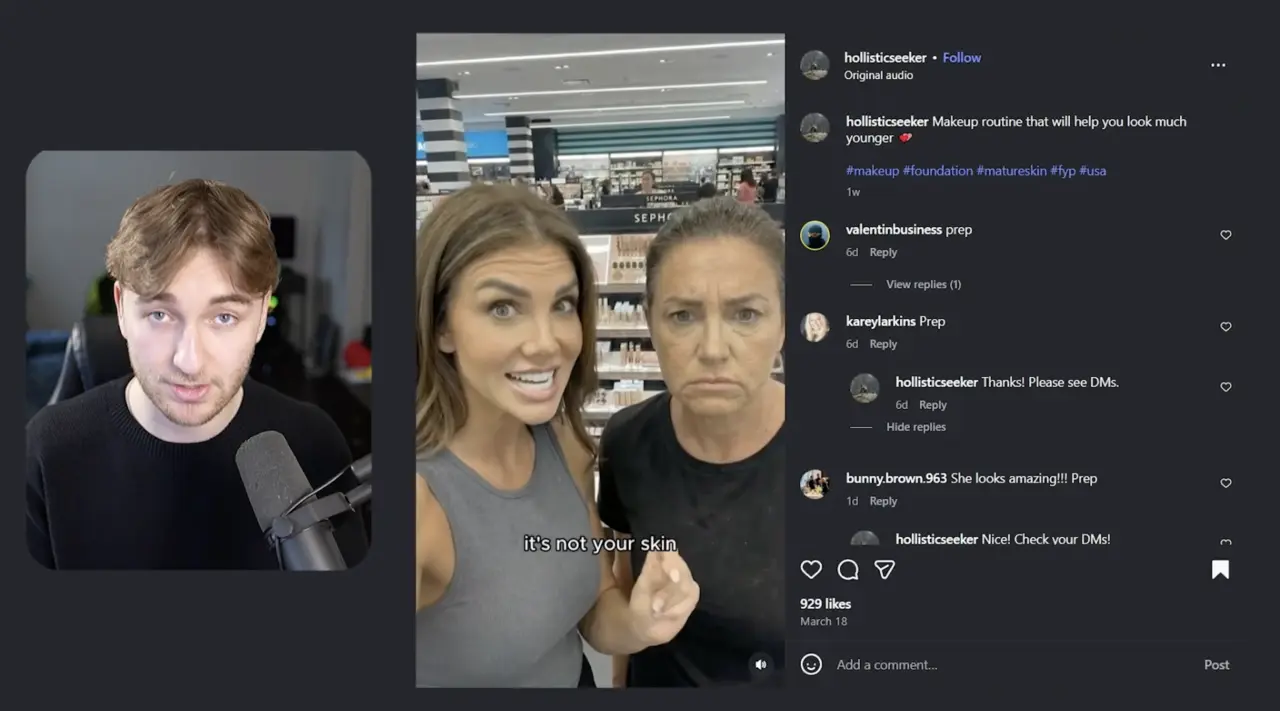
Attach a screenshot of a video that already sells as the reference. Use one you have the right to use.
Keep just the girl on the left, remove the girl on the right, make the girl on the left skin look more normal, not smooth, make her still recording in a similar position, make her lips look very dry, like she needs lip balm.
Typed in the video, with the screenshot attached.
02Scriptwriter
The script
What it does: A four-line sales script that follows a proven video's structure, with your product in it.
In the Scriptwriter, select AI Sales and add the link to a video that already sells as the reference.
I want a short video, about four lines, talking about the Dior Addict Lip Glow
Typed in the video.
If your lips look dry and flaky, it's not your skin, it's the products you're using. This balm reacts to your skin's pH to create a color that looks natural on you. It melts right in so your lips stay smooth and fresh all day without feeling greasy. It's the Dior Addict Lip Glow, and it gives you a perfect tint without any patchy lines or dryness. Comment lip and I'll send you my full routine.
Check every product claim against the brand's own page before you post.
03AI Video Generator
Clip 1: the hook line
What it does: She says the first line of the script, from the first frame.
In the AI Video Generator, load the first frame.
Make her say, if your lips look dry and flaky, it's not your skin, it's the products you're using.
Typed in the video.
Each later clip uses the same prompt with its own line from the script.
04AI Image Generator
Clip 2 frame: holding the product
What it does: Your influencer holding the product, for the line about how the balm works.
Attach a photo of the product and your influencer image as references.
make her holding this
Typed in the video.
05AI Image Generator
Clip 3 frame: applying the balm
What it does: Her lips fixed, for the line about the balm melting in.
make it so she's now applying the lip balm and her lips look great and a bit vibrant
Typed in the video.
06AI Image Generator
Clip 4 frames: in the store, and first person
What it does: Two frames for the last line: her holding the product elsewhere in the store, and a front-camera shot of just her hand holding it.
make her holding this product in another place in the store
Typed in the video.
make it so she's holding the product in her hand, recording it from first person POV like she's using the front camera on her iPhone, so all you can see is her hand holding the product up close in the store
Typed in the video.
If a frame comes back with text on it or the product looks off, ask for the text to be removed and the product made more accurate. A short line in a 5-second clip plays slowly. Add "leave three seconds of dead space at the end" to the prompt and she talks at a normal speed.
07
The finished video
What it does: All the clips cut together in order, kept raw.
- From the home page, open the video editor and drag in the clips. Captions, sound effects and music are one click each, but the video keeps it raw.
- The "comment lip" line is for a comment auto-reply that sends your affiliate link by DM. The video uses ManyChat.
Ready to make your first AI influencer video?
Pick a product, make the first frame, and animate your first line.